
Smartphone Integration in Cars
A phone can connect to a car at several levels: simple Bluetooth calling, USB media, a projected interface such as CarPlay or Android Auto, a manufacturer companion app, or a digital key. These functions use different hardware and permissions, and support for one does not imply support for the others.
Five different kinds of integration
Bluetooth can carry calls and media and may give the car access to contacts or messages after permission is granted. The result depends on the profiles supported by both devices. A2DP, for example, defines stereo audio distribution, while other profiles cover hands-free calling and message access. Bluetooth SIG: Traditional profile specifications
USB media lets some vehicles play files or audio directly. A USB port may support data and charging, charging only, or phone projection; identical-looking ports can have different functions.
Phone projection runs supported apps and services from the phone while presenting a driving-oriented interface through the vehicle’s display, audio and controls. Android Auto and conventional CarPlay belong to this category.
Manufacturer companion apps communicate with the vehicle or a cloud service. They can provide charging status, preconditioning, remote locking, route transfer or service information without projecting a full interface on the car’s display.
Digital keys use supported phone and vehicle hardware for access or starting. A vehicle can offer a companion app without a digital key, and a key may work through different technologies with different proximity and backup behavior.
Android Auto, Android Automotive and CarPlay
Android Auto runs on the phone and projects an interface to a compatible vehicle. Android Automotive OS runs directly on the car’s computer. A car can use Android Automotive without Google services, and it may support Android Auto, CarPlay, both or neither. Android Open Source Project: What is Android Automotive?
Android Auto supports wired and wireless connections on compatible phones and vehicles. The initial wireless setup uses Bluetooth pairing and also requires Wi-Fi and location services; exact compatibility remains specific to the phone, vehicle, stereo and market. Google Support: Set up Android Auto
Conventional Apple CarPlay also supports wired or wireless operation when the vehicle provides it. Apple controls the templates and app categories presented through CarPlay, while the vehicle determines the supported displays and input methods. Compatible navigation, audio, communication, parking and EV-charging apps can appear in the interface. Apple Support: Connect an iPhone to a car
CarPlay Ultra is a deeper, distinct integration. Apple describes it as a wireless phone-dependent experience that can present content across driver displays and work with automaker functions, while the vehicle’s built-in systems continue to power driving features. Availability must be checked for the exact model, market and phone; support for ordinary CarPlay does not mean a vehicle supports CarPlay Ultra. Apple Developer: CarPlay and CarPlay Ultra
Wired and wireless connections
A wired connection is usually simple to diagnose and can charge the phone, but cable quality, connector wear and port capability matter. Some vehicles have only one projection-capable port. Adapters and extension cables can add failure points.
Wireless projection removes the cable from daily use but still depends on compatible Bluetooth and Wi-Fi behavior. It can increase phone heat and energy use during navigation and streaming. A wireless charging pad may offset the energy use, but charging performance and temperature control vary substantially.
Neither method is universally better. Test reconnection after leaving the car, switching between two paired phones and returning from an interrupted call. A feature list cannot show whether the correct phone connects quickly every morning.
What the car can learn from the phone
Projection can expose selected navigation, media, calls, messages and voice-assistant functions without mirroring every phone app. Permission prompts determine whether the car can access contacts, recent calls, messages or notifications.
Deeper EV routing requires vehicle cooperation. Apple Maps, for example, can monitor charge and plan compatible charging stops only for supported vehicles and regions. Ordinary projection in another vehicle may have no access to state of charge or battery temperature. The manufacturer’s app or built-in navigation may therefore produce a more vehicle-aware charging plan.
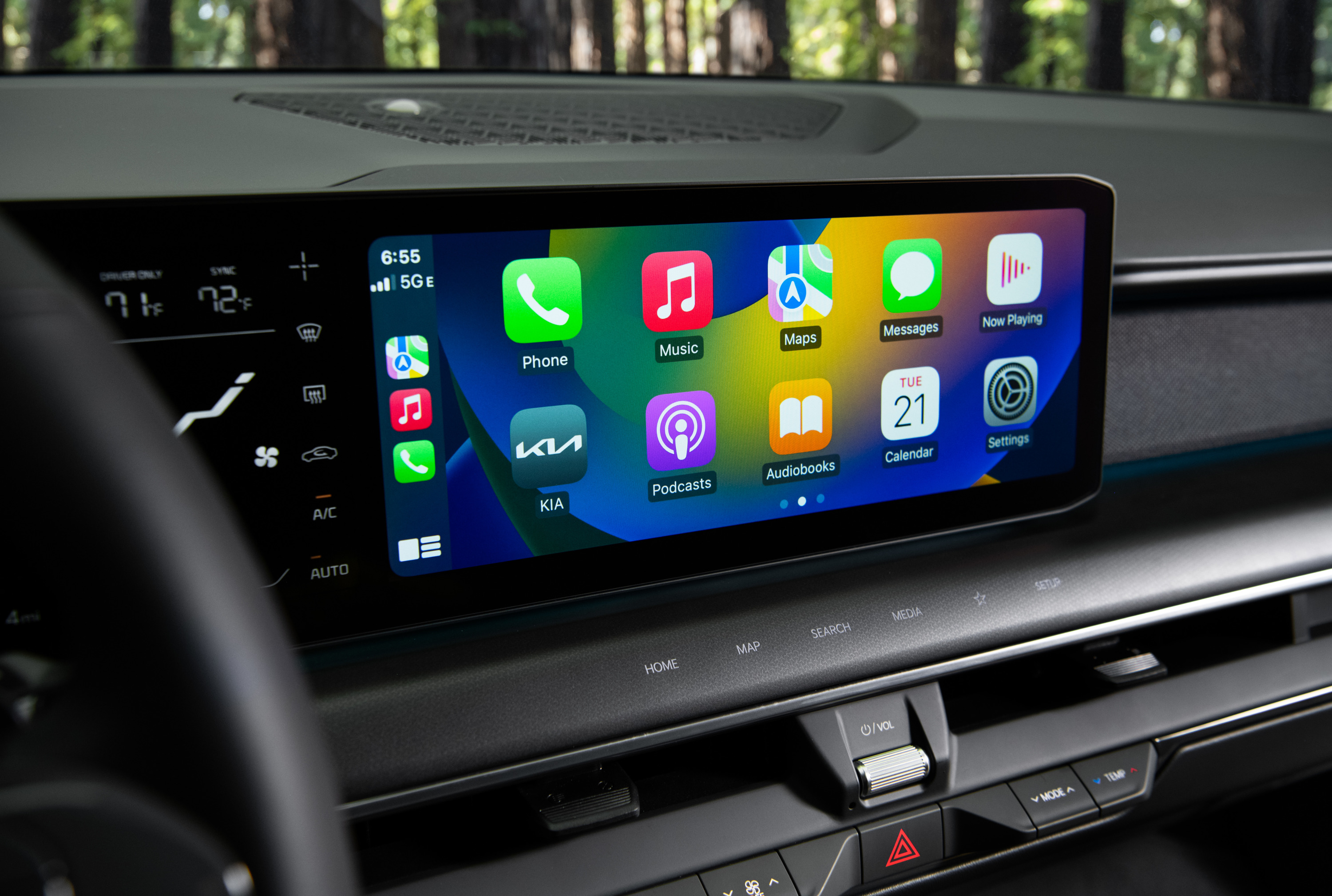
Vehicle-control apps shown inside a projected interface are still manufacturer implementations. A familiar phone interface should not be mistaken for the system that executes a climate, lock or charging command.
Privacy, accounts and shared cars
Pairing can copy or make available personal information, including device names, contacts, call history, messages, calendar destinations and location-related data. Read each permission prompt and disable access that is not needed.
In a shared or rented vehicle:
- use a guest profile if one is available;
- avoid signing into the vehicle’s native services unless necessary;
- remove the phone from the car and the car from the phone afterward;
- sign out of manufacturer apps or charging accounts shown in the vehicle; and
- verify that recent destinations and contacts have been cleared.
Before selling the car, remove digital keys and authorized drivers through the manufacturer’s account as well as performing the in-car factory reset. Those are separate actions on some platforms.
What to test before buying
Check the exact trim and market rather than relying on a model-family brochure. Connect the phone and cable you use, then test:
- wired and wireless availability;
- automatic reconnection and multi-phone priority;
- call microphone quality at road speed;
- navigation audio mixed with music;
- steering-wheel, rotary and voice controls;
- instrument-cluster or head-up-display directions;
- state-of-charge access for EV routing;
- which USB ports carry data;
- charging rate and phone temperature; and
- behavior without mobile data.
Also ask whether the feature requires a connected-services subscription and whether software updates have changed compatibility. Phone integration is valuable when it remains predictable across devices, drivers and years—not merely when its logo appears on the specification sheet.