
EV User Interfaces and HMI
An electric vehicle’s human–machine interface (HMI) is the complete conversation between people and the car: what the vehicle shows, what the occupants can command, and how the system confirms its state. In an EV, that conversation must also make energy, charging, regeneration, thermal limits, and software-defined behaviour understandable.
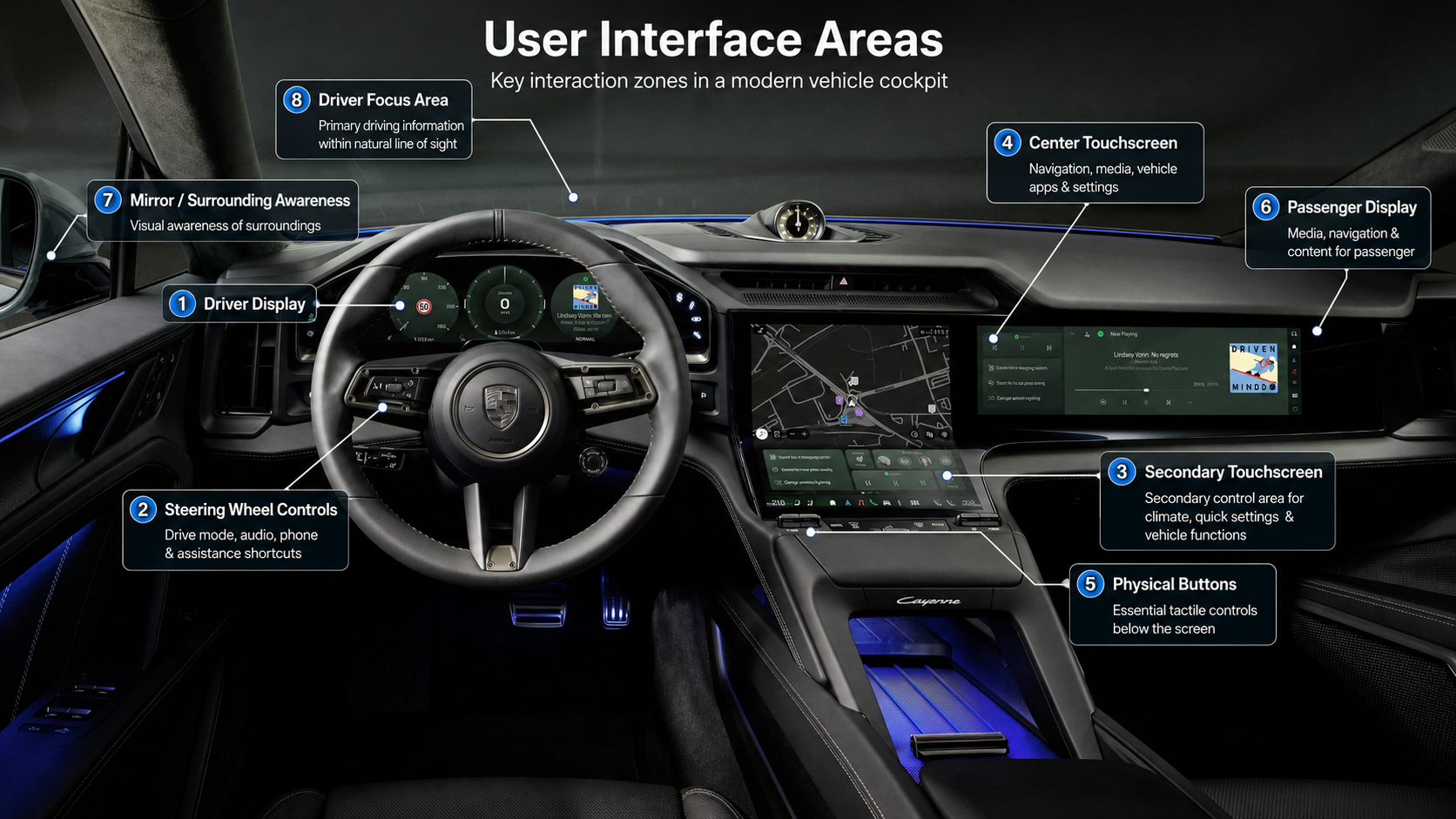
UI, UX, and HMI
The terms overlap, but they are not interchangeable.
- User interface (UI) means the controls and outputs people interact with: displays, icons, buttons, switches, stalks, sounds, speech, haptics, mirrors, cameras, and mobile apps.
- User experience (UX) is the quality of using the vehicle across an entire task, including how easy it is to learn, how quickly it responds, how well it recovers from errors, and whether its behaviour earns trust.
- Human–machine interface (HMI) is the wider system linking the person, the controls, the information presented, and the vehicle’s current operating state.
A polished screen can still produce poor UX if a common action is buried, feedback is delayed, or the car changes mode without making that change clear. Good HMI closes the loop: the user can perceive the state, understand the available action, operate the control, and verify the result.
What good vehicle HMI must do
The interface should help the driver answer four questions without unnecessary search:
- What is the vehicle doing?
- What can I do now?
- What did my input change?
- What requires my attention?
That calls for a clear information hierarchy. Speed, warnings, driving mode, assistance status, and other time-critical information belong in the driver’s immediate view. Navigation detail, charging plans, settings, and media can occupy deeper layers. Parked tasks can tolerate more interaction than tasks performed while the vehicle is moving.
Predictability matters as much as speed. A control should behave consistently, give immediate feedback, and make an error easy to reverse. Colour should not carry meaning alone. Icons need labels or familiar conventions where interpretation is not obvious. Alerts need distinct urgency without turning every notification into a crisis.
ISO 15005 sets ergonomic principles for dialogue between a driver and transport information and control systems while a vehicle is moving. NHTSA’s driver-vehicle interface guidance applies the same human-factors foundation more broadly: design around human capabilities and limits, not around what a processor or display can technically provide. ISO 15005:2017 — Dialogue management principles NHTSA — Human Factors Design Guidance for Driver-Vehicle Interfaces
Why EVs ask more of the interface
Many important EV states are invisible. The driver cannot directly see battery temperature, charge acceptance, a changing regeneration limit, or the assumptions behind a range estimate. The HMI has to translate them into useful decisions.
The most valuable EV information usually includes:
- displayed state of charge and estimated range;
- predicted state of charge at the destination and planned charging stops;
- consumption and the effect of speed, weather, elevation, load, and climate use;
- charge target, charging power, time to target, and session status;
- battery preconditioning and fast-charging readiness;
- selected regeneration behaviour and any temporary limit;
- available propulsion power and the reason for a reduction;
- the active driver-assistance mode and the driver’s remaining responsibility.
The deeper issue is state transition. An EV moves between parked, ready, driving, assisted driving, preconditioning, charging, updating, and reduced-performance states. When responsibility, response, or availability changes, the interface must announce the change at the right time and explain what follows.
The dedicated EV information design chapter examines how these energy states should be presented.
Match the control to the task
No single interaction method is best for every job.
Screens in EVs can present maps, charging plans, energy graphs, cameras, media, and settings. Their flexibility is useful, but a flat glass surface offers little positional or tactile guidance.
Physical controls provide mechanical movement, resistance, shape, and location that can support operation by touch. They suit frequent or time-sensitive actions when the control remains easy to identify.
Steering wheels and controls controls and Stalks and column controls keep selected functions close to the driver’s hands. Their value depends on clear grouping, tactile distinction, and visible confirmation of any mode-dependent action.
Head-up displays can place a small set of driving information near the forward view. It reduces the need to look down, but it can still compete for attention if it becomes crowded or poorly aligned.
Voice control can work well for destinations, calls, media, and simple climate requests. It removes some manual and visual interaction, but it does not remove cognitive workload and needs concise feedback plus an alternative control path.
Gesture control can provide a secondary shortcut for a small command set. Recognition, discoverability, false activation, and confirmation become critical because a mid-air action has no inherent physical boundary.
Mirrors and camera-monitor systems and camera-monitor systems are also interfaces. They transform the environment into visual information, so field of view, display location, image quality, latency, contamination, and failure behaviour all matter.
The strongest cockpit combines these methods according to task frequency, urgency, complexity, and context. Screen count is not a measure of HMI quality.
Driver attention and control access
Driver distraction can be visual, manual, cognitive, or a combination. NHTSA’s visual-manual guidelines are voluntary design guidance rather than a regulation, but they establish an important principle: interactions available while driving should be assessed by the demand they place on the driver, not merely by whether they are technically possible. NHTSA — Visual-Manual Driver Distraction Guidelines
Euro NCAP’s 2026 Safe Driving assessment now evaluates general vehicle controls as part of Driver Engagement. Its protocol distinguishes direct physical input, direct touch input, voice input, and menu-based input, with defined access and feedback expectations for assessed functions. This is a consumer-rating protocol, not a universal law, but it gives buyers a current, testable view of control usability. Euro NCAP — 2026 Safe Driving protocols
The practical design priorities are clear:
- keep essential driving information in the driver’s direct view;
- give frequently used controls stable, discoverable access;
- avoid precise or multi-step visual interaction for urgent tasks;
- show which assistance mode is active and what the driver must still do;
- make critical actions possible when voice, cloud service, or a display is unavailable;
- defer reading, text entry, configuration, and entertainment tasks when driving;
- provide feedback that is prompt, specific, and proportional to urgency.
Physical access alone does not guarantee good design. A crowded panel of identical buttons can be harder to use than a well-structured display. The question is how much attention a real task requires, including finding the control, completing the action, and confirming the result.
What to evaluate in an EV
A short showroom demonstration rarely exposes weak HMI. A useful test drive includes common tasks and changing states:
- Can you read speed, state of charge, and assistance status at a glance?
- Can you adjust temperature, demist, audio volume, and driver assistance without searching?
- Does navigation show arrival state of charge and charging stops clearly?
- Does the car indicate battery preconditioning and explain slow charging?
- Can you tell when regeneration or power is limited and why?
- Do wheel controls, stalks, and touch targets work reliably on a rough road?
- Are alerts understandable, or do icons and tones require guesswork?
- Does voice control confirm the intended action before a consequential change?
- Can displays be dimmed without losing critical information?
- Does the mobile app identify stale data and confirm whether a remote command succeeded?
An HMI succeeds when it makes the vehicle’s state and the next safe action easy to understand. Its best work is often quiet: fewer glances, fewer corrections, fewer surprises, and less need to learn the car’s internal logic.